Thứ Sáu, 4 tháng 9, 2015

Google Drive Bonus Storage Is Expiring

2 years ago, Google offered 10 GB of free storage for installing the Quickoffice app for Android or iOS. Unfortunately, Google's bonus storage is about to expire.

"We wanted to let you know that you have bonus Google Drive storage expiring on Oct 3 2015. While this bonus period is coming to an end, you can always purchase additional storage," informs Google. "Rest assured that your files in Google Drive remain safe and accessible by you and the people you've shared them with. You just won't be able to add or sync any files unless you are using less than your current available storage or you've purchased additional storage."


Basically, Google won't delete your files, but you'll have to delete some of them or purchase more storage if you actually used the 10 GB bonus storage. Since the storage is shared between Gmail, Google Photos and Google Drive, all of these services are affected and you can also delete Gmail messages with large attachments or photos and videos from Google Photos that use your Google storage. Here's how to find Gmail messages with big attachments and a list of Google Drive files sorted by size.

More About Google's New Visual Identity

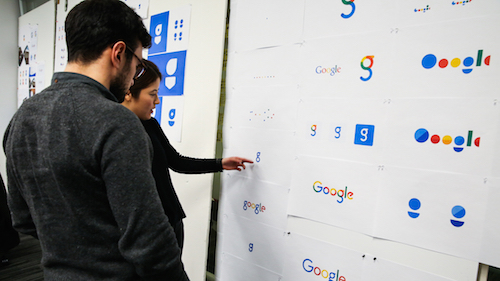
Google Design's site has an interesting article about Google's new identity. Google's designers started by "distilling the essence of the brand down to its core" and built 3 elements that work on any platform: a sans serif logotype, the dynamic dots that respond to users and a compact version of the Google logo.


Some people said that Google's new logo is childish and it really is. "The Google logo has always had a simple, friendly, and approachable style. We wanted to retain these qualities by combining the mathematical purity of geometric forms with the childlike simplicity of schoolbook letter printing. Our new logotype is set in a custom, geometric sans-serif typeface and maintains the multi-colored playfulness and rotated ‘e’ of our previous mark—a reminder that we’ll always be a bit unconventional," mention Google's designers.

The dots are a brilliant way to convey the full Google logo in a Material Design approach. "The Google dots are a dynamic and perpetually moving state of the logo. They represent Google's intelligence at work and indicate when Google is working for you. We consider these unique, magic moments. A full range of expressions were developed including listening, thinking, replying, incomprehension, and confirmation."


Google now uses pixel-perfect SVGs for base assets and generates thousands of vector-based variants. For example, there's a version of the logo that's optimized for low-bandwidth connections and is only 305 bytes. Google's old approach was to serve a text-based approximation of the logo.

All in all, the new logo is more flexible, works better for devices with small screens and there's an animated abstract version. For the first time, Google's logo becomes a user interface control that communicates information and connects users to Google.

{ Thanks, Brendan Early. }

Thứ Năm, 3 tháng 9, 2015

Templates, Insights and Dictation in Google Docs

Google's standalone web apps for Docs, Sheets and Slides now show a list of templates you can choose to quickly create a document, spreadsheet or presentation. For example, Google Docs shows templates for resumes, reports, letters and you can expand the list to see even more templates (essays, class notes, project proposals, meeting notes, brochures, newsletters).


Google Sheets has templates for to-do lists, budgets, calendars, schedules, invoices, time sheets and more.


Google Slides also has a few templates for photo albums, pitches, status reports, lesson plans, portfolios, weddings, party invites and more.


Another new feature lets you get insights on a spreadsheet by simply selecting a range of cells and clicking Explore. This feature works in the desktop web app and the Android app and it shows trends, patterns and even charts for the data you've selected. It's surprisingly useful.


Google Docs now shows the new changes in a collaborative document. "If there are new changes, click the New changes button to the right of the Help menu. You can also click the File menu > See new changes."

Voice typing lets you dictate a text in Google Docs for desktop, but only if you use Chrome. Activate this feature from the Tools menu and speak in one of the 40 supported languages. You can say "period", "comma", "question mark", "exclamation mark", "new line", "new paragraph" to add punctuation to your text.


You can customize your forms by picking a theme or adding a photo. Google chooses the right color palette to match your photo. Insert images and YouTube videos to illustrate your questions.


{ Via Google Docs Blog. Thanks, Brendan and Jérôme. }

Thứ Tư, 2 tháng 9, 2015

Updated Mobile UI for Google's Related Searches

Google Mobile Search has a new interface for related searches. Google usually shows up to 8 related searches at the bottom of the search results pages, but now the list looks different: there's a table with white rows and small arrows next to each related query.


Click a related search and you can see the search results for that query and even more related searches. You can start with a generic query like [nightingale] and create a more specific query by only clicking on related searches. For example, you can find searches like [sound of a nightingale singing], [Yanni nightingale live] or [how do you become a nightingale in Skyrim?].

Thứ Ba, 1 tháng 9, 2015

Google's New Colorful Favicon

Google has a new logo, but it also has a new favicon. It's now a capital G that uses the four Google colors: blue, red, yellow and green.

Here's a screenshot that shows the old favicon launched in 2012 and the new one:

This is the new favicon, which is also used as an icon for Google Search:

You can find it in Google's app launcher and soon in Chrome's app launcher and in Android, as an icon for the Google Search app.

Google Photos, The New Home for Your Private Photos

I've clicked the Photos link from the Google+ navigation menu. The page redirected to Google Photos and it displayed a new message:

"Welcome to Google Photos, the new home for all your private photos. The photos you've shared on Google+ are still available in the photos tab of your Google+ profile."


The message links to https://plus.google.com/me/photos, which is the photos tab from your Google Profile. Until now, Google Photos linked to Google+ Photos, bypassing the redirect.

You can still go to Google+ Photos using this link: https://plus.google.com/photos/highlights, but I don't know for how long. Most likely, Google+ Photos will disappear soon.

New Mobile Google Homepage

Google's mobile homepage looks different. The tabs for web search and image search are now blue and you can finally use the app launcher. Just click the grid icon to see the same app launcher from the desktop site. Many shortcuts will open the corresponding mobile apps instead of the mobile sites.


For now, the app launcher is only available from the Google homepage and from Google Image Search's homepage.


Google has recently changed the color of the tabs from red to blue for both the desktop site and the mobile site. There's now a bigger Google logo at the top of the page and the header uses more space.