Thứ Sáu, 13 tháng 11, 2015

YouTube Music

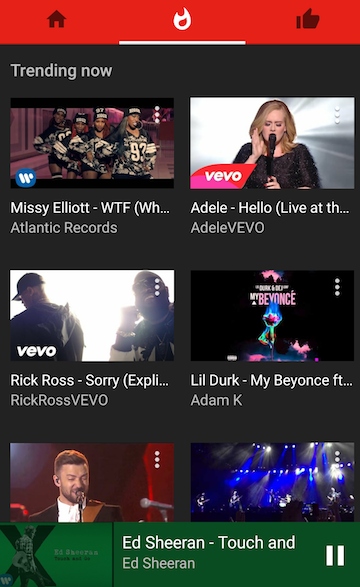
YouTube launched specialized mobile apps for kids, gamers and now for music lovers. YouTube Music replaces the music section from the regular YouTube app and provides a better interface for playing music. There are no comments, you can switch between the video mode and the audio-only mode, the autoplay feature is enabled by default and you can't disable it.

"With YouTube Music, you'll get a completely new type of experience, designed to make discovering music on YouTube easier than ever. No matter where you start in the app, the music will never stop. Every song you play or artist you choose will take you on an endless journey through YouTube's music catalog. (...) The home tab will recommend tracks just for you and create personalized stations based on your tastes," informs the YouTube blog.

You can download YouTube Music from Google Play Store and Apple App Store, but only in the US. If you're not in the US and you manage to install the app, you won't be able to use it without a proxy/VPN service.

YouTube Music works even better if you use YouTube Red, so you get the YouTube Red features for free for 14 days. No ads, background audio, offline music.



Thứ Tư, 11 tháng 11, 2015

Google's Timer and Stopwatch Card

Google's timer card added a new feature: stopwatch. You can search for [stopwatch] or search for [timer] and switch to the stopwatch tab. Click start/stop, reset or use the full screen option for an immersive experience. You can't add laps and the "stop" button should probably be renamed "pause".


To start the timer, search Google for [timer 10 minutes], [countdown 5 minutes], [set timer for 30 seconds], [start a timer for 1 hour and 45 minutes], [set a timer for half an hour], [start a timer until 13:00], [start a timer until midnight] and more.


It's worth pointing out that you can use both features simultaneously.

{ Thanks, Jonah Langlieb. }

Thứ Ba, 10 tháng 11, 2015

Google About Me

It looks like Google works on a replacement for Google+ profiles. About Me is a new site that lets you control what people see about you. "Changes you make here show up across Google services like Drive, Photos, Google+ & others," informs Google.


You can change your name, photo, sites, gender, birthday and occupation. If you click the "+" button, you can also add work contact info, personal contact info, education, work history and places.

"You can change what other users of Google products see about you. For instance, when you connect with people on apps like Gmail or Hangouts, you can choose to share certain additional information with them, like your birthday and phone number," mentions Google's help center.

For now, the "view as public" feature doesn't work. "You'll soon be able to see what you look like to other people across Google services in this card. While we are working on it, view your public Google+ profile," suggests the site.

{ Thanks, Elchanan. }

Full-Featured Offline Google Maps

Google Maps has a really cool mobile app for Android and iOS, but most of its features aren't available when you're offline. You can cache maps for small regions and that's pretty useful, but what if you want to cache the maps for an entire country or use navigation and driving directions when you're in a different country? The Here app offers this feature for free and now you can use it in Google Maps too.

"Now you can download an area of the world to your phone, and the next time you find there's no connectivity — whether it's a country road or an underground parking garage — Google Maps will continue to work seamlessly. Whereas before you could simply view an area of the map offline, now you can get turn-by-turn driving directions, search for specific destinations, and find useful information about places, like hours of operation, contact information or ratings," mentions Google.


"You can download an area by searching for a city, county or country, for instance, and tapping 'Download' on the resulting place sheet, or by going to 'Offline Areas' in the Google Maps menu and tapping on the + button. Once downloaded, Google Maps will move into offline mode automatically when it recognizes you're in a location with spotty service or no connectivity at all. When a connection is found, it will switch back online so you can easily access the full version of Maps, including live traffic conditions for your current route."


The new feature is gradually rolling out in the latest version of Google Maps for Android and it will soon be added to the iOS app. 6 years after launching turn-by-turn navigation, this feature works offline and Google Maps can finally replace paid navigation apps.

Thứ Năm, 5 tháng 11, 2015

Multiple Search Results For Google News

When searching Google for [news], the first page shows 9 results and 4 of them send users to Google News. The news site owned by Google is the top search result, but there are also 3 duplicate results that have some additional parameters:

https://news.google.com/?utm_source=buffer&utm_campaign=Buffer&utm_content=bufferdb898&utm_medium=twitter

https://news.google.com/?utm_content=buffer73b38&utm_source=buffer&utm_medium=twitter&utm_campaign=Buffer

https://news.google.com/?utm_source=buffer&utm_campaign=Buffer&utm_content=buffer67782&utm_medium=twitter


This is obviously a bug and it's strange to see that Google didn't ignore Google Analytics parameters.

Google News Card

Here's a quick way to find the latest news stories when using a mobile device. Just search Google for [news] and you'll get a card that shows the top stories. Tap the arrow icons or swipe left/right to switch to other Google News sections like world news, business, technology, entertainment, sports, science or health.


Google Updates Search Interface For Tablets

It looks like Google updated the search interface for tablets and switched to the mobile UI. The previous tablet interface was an interesting combination between the desktop and mobile UIs.

Here's a screenshot from Safari for iPad:


And here's a screenshot from Nexus 7:


It's strange to see that Google still shows the "mobile-friendly" label, even though it's not that important for tablets. It's also weird that Google abbreviates long URLs, while there's enough space to display the entire URLs. Google switched to the mobile UI and forgot to optimize it for tablets.