Thứ Ba, 24 tháng 11, 2015

Big Offline Google Maps

I don't know about you, but my Google Maps for Android has just enabled the new offline features. Even if you have the latest version of the app, you still need to wait until these features are enabled because they're gradually rolled out.

My first disappointment is that the new features are still limited. The biggest size for an offline area you can download is 120,000 square kilometers and there are many countries that are bigger than that. I downloaded London's map and checked the size of the map: 332 MB. It also expires in 29 days (maps need to be updated at least every 30 days).


It looks like Google's maps include too much information, they take up too much space and there's no way to download some simplified maps.

Let's try one of the smallest countries in Europe: Liechtenstein, which has an area of only 160 square kilometers. The offline map has 62 MB. New York? 409 MB. Los Angeles? 356 MB. Tokyo, Seoul, Beijing, Bangkok? Not available because of licensing issues.


Forget about downloading the map for an entire country. Google Maps still can't replace the Here app or paid navigation apps.

Google Star Wars Experience

Google has a new site for Star Wars fans. You can join the dark side or the light side and transform your Google experience across Gmail, Google Calendar, Google Maps, Waze, Google Translate, YouTube, and other Google services.


"We reached out to our friends at Lucasfilm and Disney, and since then we've been working together on building google.com/starwars. It's a place for fans, by fans, and starting today you can choose the light or the dark side, and then watch your favorite Google apps like Gmail, Google Maps, YouTube, Chrome and many more transform to reflect your path. And that's just the beginning. We've got more coming between now and opening night — the Millennium Falcon in all its (virtual reality) glory included, so stay tuned. And we've hidden a few easter eggs, too. So awaken the Force within, and be on the lookout for things from a long time ago in a galaxy far, far away," mentions Google's blog.


There's a new Star Wars theme in Gmail, a new progress bar for the loading page and probably some other changes.


Google Inbox has a Star Wars background image.


Google Calendar adds some Star Wars events like "Star Wars: The Force Awakens in theaters everywhere".


YouTube has a new progress bar for Star Wars fans. Check the player too.

Google's Deals Alerts

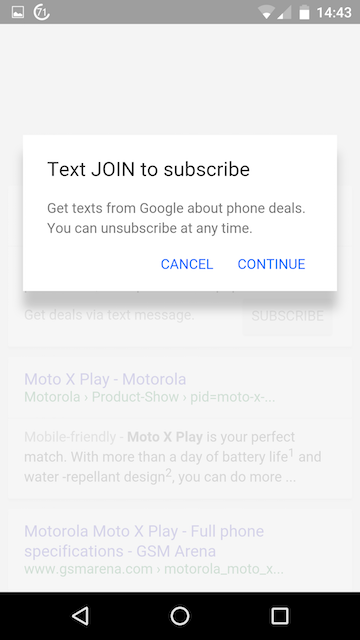
Google's mobile search site shows some ads that promote a new notification service. Google's own ads feature a "subscribe" button that lets you "stay up to date on the latest deals, promotions, and updates from popular retailers". Basically, you'll get deals via text messages, just in time for Black Friday.


Tap the "subscribe" button and then you can text "join" to Google's SMS number: +1-646-665-2745. There are multiple alerts for phones, computers, TVs and more.

Thứ Sáu, 13 tháng 11, 2015

Chrome Beta for iOS

In addition to the stable channel, there are 3 other Chrome channels you can use to check the latest features before they're released for everyone: beta, dev and canary. Canary builds are only for Windows and Mac, the dev channel is available for Windows, Mac, Linux, Chrome OS and Android, while the beta channel is available for Windows, Mac, Linux, Chrome OS, Android and now iOS.

That's right, you can try out Chrome Beta for iOS. You need to enter your email address and confirm you "understand that Google will share your information with Apple in order to participate in the TestFlight program". Google will send a confirmation email. "Once you have confirmed your e-mail address, you can expect to receive an invitation to join TestFlight within a few minutes."


Install the TestFlight app on your iOS device, tap "redeem" and enter the code from the invitation. If you've already installed Chrome on your phone or tablet, TestFlight will ask you if "you want to replace the current app version with the test version".

Right now, you can upgrade from Chrome 46.0.2490.73 to Chrome 47.0.2526.53. The new version adds support for more Bluetooth keyboard shortcuts (open/close/change tabs and voice search) and adds 3D touch support on iPhone 6s and iPhone 6s Plus (force touch the Chrome icon to open a new tab, a new incognito tab or start a voice search).


{ Thanks, Stefan. }

YouTube Music

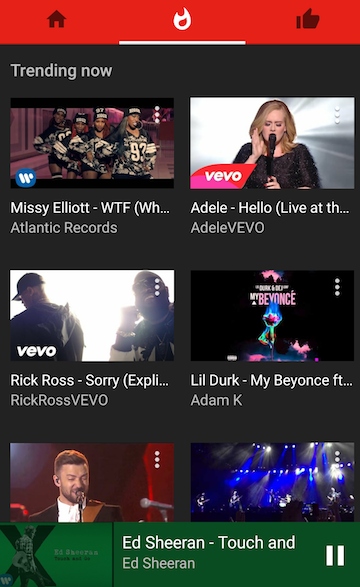
YouTube launched specialized mobile apps for kids, gamers and now for music lovers. YouTube Music replaces the music section from the regular YouTube app and provides a better interface for playing music. There are no comments, you can switch between the video mode and the audio-only mode, the autoplay feature is enabled by default and you can't disable it.

"With YouTube Music, you'll get a completely new type of experience, designed to make discovering music on YouTube easier than ever. No matter where you start in the app, the music will never stop. Every song you play or artist you choose will take you on an endless journey through YouTube's music catalog. (...) The home tab will recommend tracks just for you and create personalized stations based on your tastes," informs the YouTube blog.

You can download YouTube Music from Google Play Store and Apple App Store, but only in the US. If you're not in the US and you manage to install the app, you won't be able to use it without a proxy/VPN service.

YouTube Music works even better if you use YouTube Red, so you get the YouTube Red features for free for 14 days. No ads, background audio, offline music.


Thứ Tư, 11 tháng 11, 2015

Google's Timer and Stopwatch Card

Google's timer card added a new feature: stopwatch. You can search for [stopwatch] or search for [timer] and switch to the stopwatch tab. Click start/stop, reset or use the full screen option for an immersive experience. You can't add laps and the "stop" button should probably be renamed "pause".


To start the timer, search Google for [timer 10 minutes], [countdown 5 minutes], [set timer for 30 seconds], [start a timer for 1 hour and 45 minutes], [set a timer for half an hour], [start a timer until 13:00], [start a timer until midnight] and more.


It's worth pointing out that you can use both features simultaneously.

{ Thanks, Jonah Langlieb. }

Thứ Ba, 10 tháng 11, 2015

Google About Me

It looks like Google works on a replacement for Google+ profiles. About Me is a new site that lets you control what people see about you. "Changes you make here show up across Google services like Drive, Photos, Google+ & others," informs Google.


You can change your name, photo, sites, gender, birthday and occupation. If you click the "+" button, you can also add work contact info, personal contact info, education, work history and places.

"You can change what other users of Google products see about you. For instance, when you connect with people on apps like Gmail or Hangouts, you can choose to share certain additional information with them, like your birthday and phone number," mentions Google's help center.

For now, the "view as public" feature doesn't work. "You'll soon be able to see what you look like to other people across Google services in this card. While we are working on it, view your public Google+ profile," suggests the site.

{ Thanks, Elchanan. }